

Most people try AI the same way.
They open ChatGPT. Ask something random. Get a bland answer.
Close the tab.
Then they decide AI is overrated.
The tool was fine. The aim was wrong.
You would never hire an assistant and then refuse to tell them what you do all week. That is exactly how most people use AI.
Today you fix that. In about 20 minutes.
New here, or here from before? This publication has a new focus. Every Sunday: one AI workflow you can use the same day. If that is not for you, the unsubscribe link is at the bottom. If it is, welcome.
Two things before we start:
Block 20 minutes today. Not “someday.” Today.
Open ChatGPT, Claude or Gemini in another tab. You will use it while you read.
1. What you walk away with
Three tasks from your own week that AI can start on today.
Each one with a prompt you can copy and paste.
Not my list. Yours.
2. What you need
Any major AI assistant. Free versions can run this prompt. I used Claude on a paid plan.
A rough picture of your week.
About 20 minutes. That is my estimate; a long list takes longer.
No setup. No paid plan required. No technical knowledge.
3. Ten jobs to steal ideas from
A warm up before you write your own list. Ten jobs AI handles well, as long as you check the result.
The brain dump. Paste everything on your mind. Ask for a prioritised to do list.
The tricky email. Ask for clearer, calmer or more diplomatic. Add: “Do not add anything I did not say.”
The long document. Ask only for decisions, deadlines and anything that needs a reply.
The hard conversation. Ask AI to play the other person. Then ask where you sounded unclear.
The confusing letter or bill. Get it explained in plain language. Understanding it, yes. Legal or financial advice, no.
The empty fridge. List what you have. Get a week of meals.
The messy meeting notes. Ask for action items with owners and deadlines. Tell it to mark gaps instead of guessing.
The impossible choice. Phones, suppliers, courses, apartments. Give it your criteria, not just the options.
The thing you want to learn. Ask for a study plan. Then ask it to quiz you.
The task you keep avoiding. Get an ugly first draft. Fixing is easier than starting.
The rule. AI is good at the first draft. You are responsible for the final one.
Useful list. But it is still someone else’s week.
The jobs worth handing over are hiding in yours. Let’s find them.
4. The audit, step by step
Step 1: Dump your week. Everything you do in a normal week. Work and home. The boring stuff counts most. Aim for ten tasks or more.
Be specific. This is where most people go wrong.
Vague: “admin.”
Specific: “chasing three late invoices every Friday.”
The second one gets you a useful answer. The first one gets you a generic one.
Step 2: Put a time next to each. Guess. Nobody is checking. It tells the AI where help pays off most.
Step 3: Circle what is private. Client names, employer data, health, money. Leave it out, or describe it in general terms.
Step 4: Paste the prompt below. Fill in the brackets. Send.
Step 5: Use one result today. Not tomorrow. An audit you never act on is just another list.
5. The prompt
Copy this:
I want to find out which parts of my week AI could realistically help with.

About me: [your job or main role]. The tools I use most: [for example email, spreadsheets, documents]. Information I cannot share with an AI tool: [list it].

Here are the tasks I do in a typical week, with rough time spent on each:
1. [task] ([time])
2. [task] ([time])
(List at least 10, including personal admin.)

Please do the following:
1. Sort every task into one of three groups: "AI does most of it, I review," "AI assists, I lead," or "Keep human" (judgement, relationships or confidential information).
2. Explain each decision in one sentence.
3. Choose the three tasks where AI help would save the most time or stress this week.
4. For each of those three, write a ready to use prompt I can copy, with placeholders in square brackets.
5. Tell me what I must check in each output, and flag any privacy risk.

Ask me up to three questions first if anything is unclear. Be realistic and do not overstate what AI can do.
Tip. Two lines do the heavy lifting. “Information I cannot share” makes the AI design around your limits. “Ask me up to three questions first” makes it interview you instead of guessing.
Got a generic answer back? Your list is too vague. Make it specific and run it again.
6. What it looks like on a real week
I ran this on my own week before sending it to you.
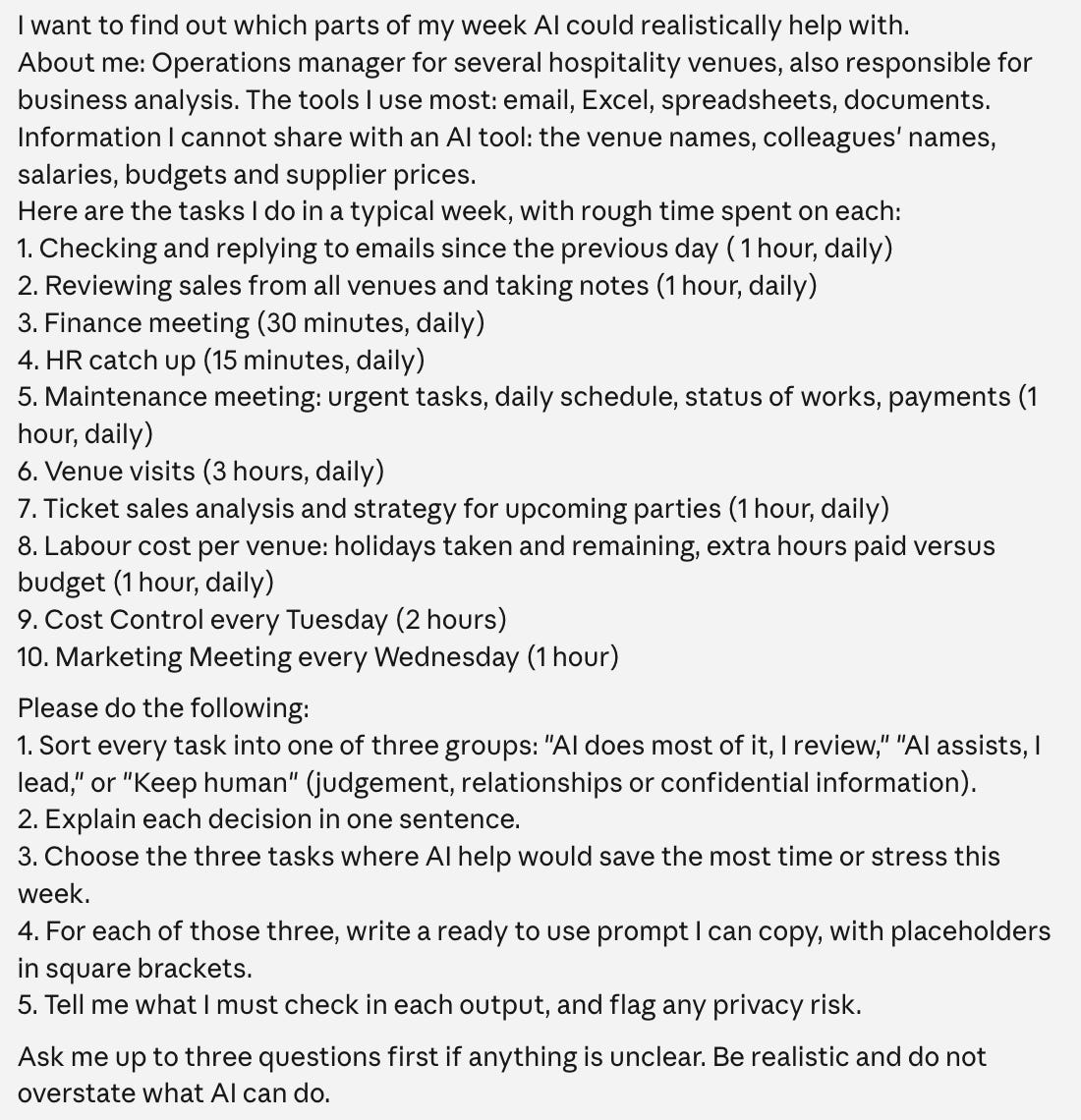
My real week. Ten tasks, with names, salaries, budgets and supplier prices removed before sending.
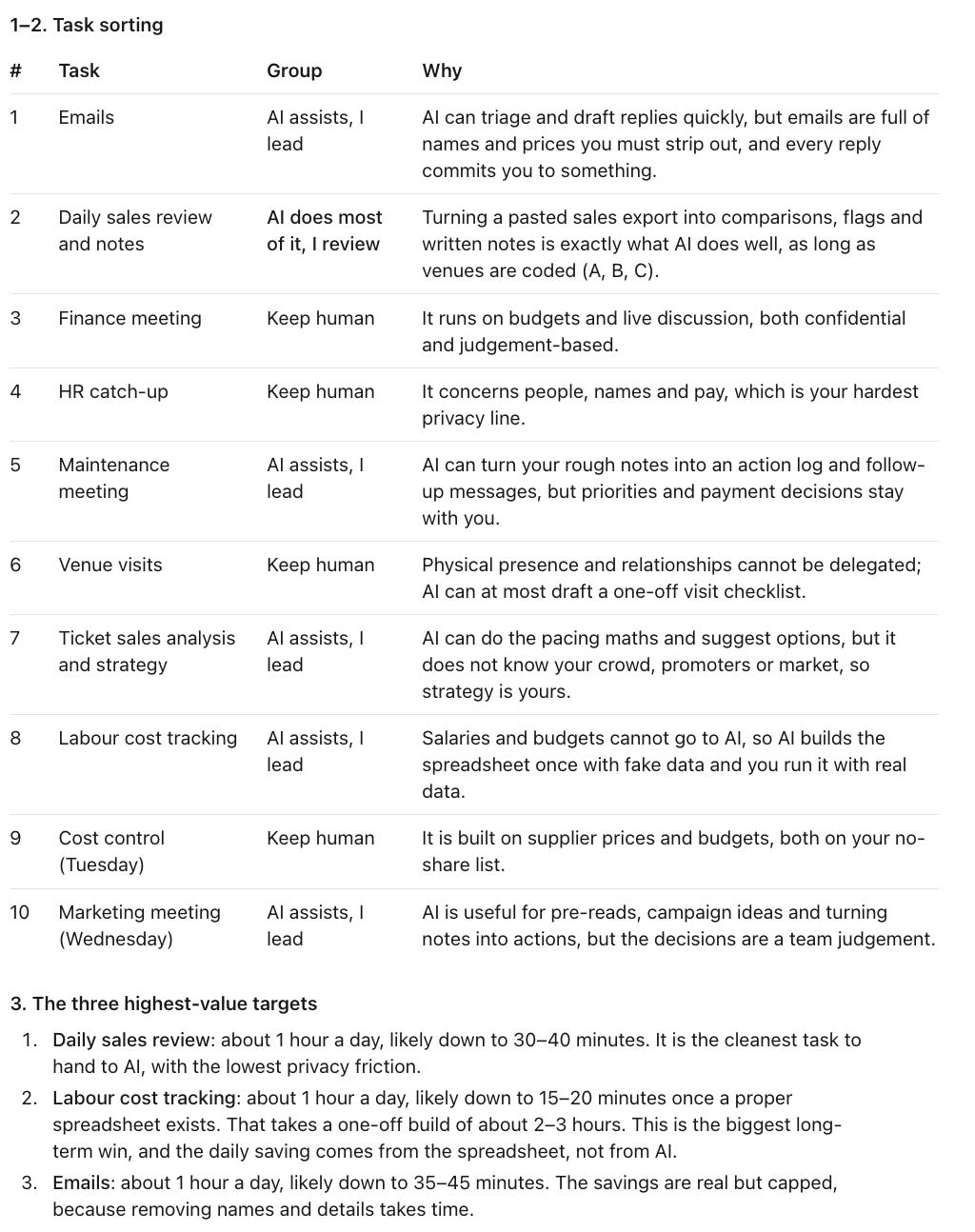
Only one of my ten tasks landed in “AI does most of it.” Four stayed fully human. That honesty is the point.
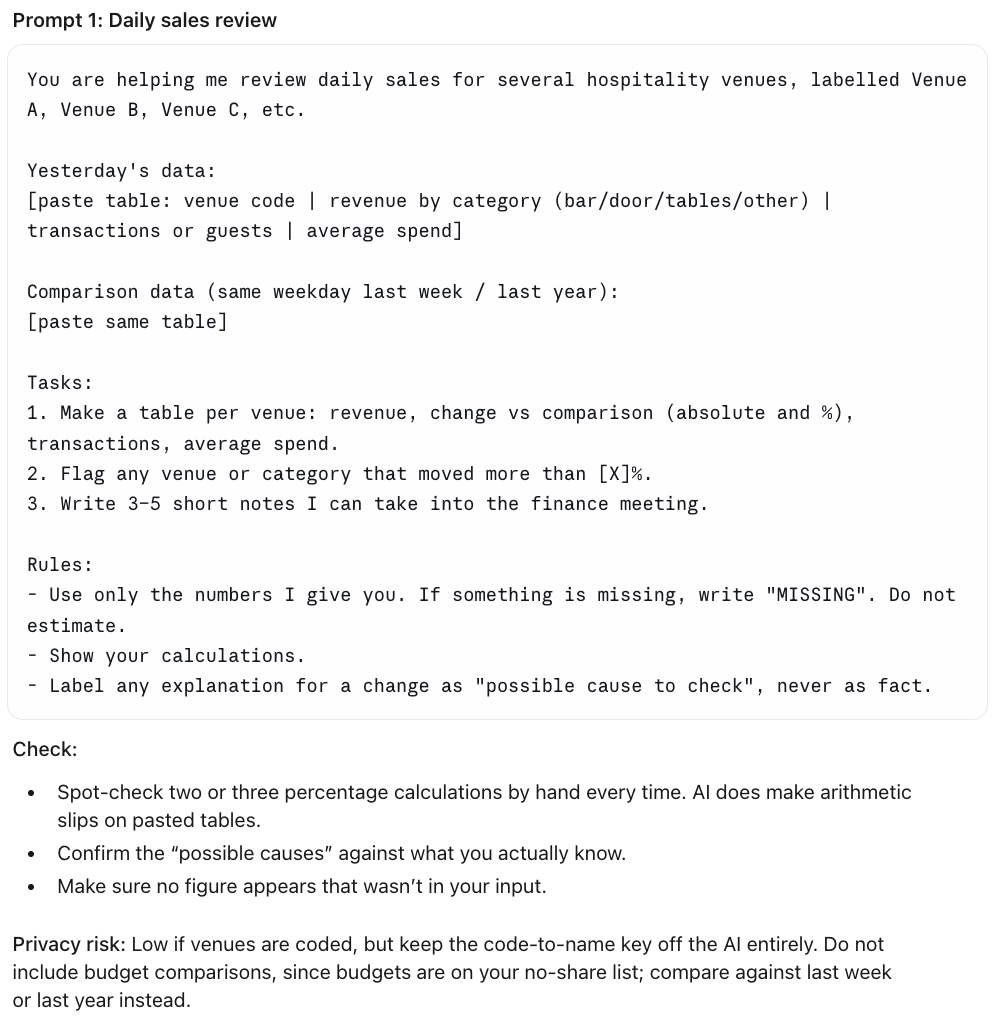
The first prompt it wrote for me. Notice the rule “Do not estimate.” I run it on Monday’s sales and will report what holds up.
So what just happened?
I gave it my real week, not a random question.
It said it had enough information, and stated its two assumptions instead.
It sorted every task into three groups.
It picked three tasks worth handing over.
It wrote a prompt for each one.
What struck me is what it refused to take. Most of my day is meetings and venue visits, and it left those with me. It estimates the three prompts could save me 1.5 to 2 hours a day once they are running. That is its estimate, not my result. I am testing it over the coming weeks, and I will tell you what actually holds up.
7. Where this shines, and where it does not
Where it shines:
Spotting repetitive tasks you stopped noticing.
Writing starter prompts for jobs you never thought to hand over.
Turning “I should use AI” into three concrete actions.
Where it does not:
It only knows what you tell it. Thin list, thin answer.
It cannot judge what is confidential at your workplace. You can.
It will sound sure about every task. That does not make every call right.
Watch out. The AI will sort every task, confidently. You decide where each one really belongs. And keep confidential client and company information out of any tool your employer has not approved.
8. Where to start
You do not need to master AI this week. You need one win.
Write your list today.
Run the prompt.
Use one of the three prompts before tonight.
Save the other two for this week.
Hit reply and tell me the one task you most want to hand over.
I read every reply. The most common answers become future Sunday workflows.
Next Sunday: how to make AI write like you. Not like a robot.
Know someone who keeps saying “I really should start using AI”?
Forward this. It is the 20 minutes they keep putting off.
Now We AI. Practical AI for work, money and life. No hype. Just workflows.