


Every new chat with Claude starts from zero.
It doesn’t know how you like your answers. It doesn’t know what you’re working on. It hasn’t seen the documents that matter. So you explain everything again, every time.
It doesn’t have to work that way. The free plan includes features that let Claude start every conversation already knowing your rules and your material. Most of them take less than five minutes to set up.
To test them properly, we planned a weekend in Lisbon from start to finish on a free account. Here is what worked, what tripped us up and what you still need to check yourself.
What you will set up
Standing instructions Claude follows in every chat.
A Project: a workspace with its own rules and files.
Answers based on your own documents.
Web answers you can actually trust.
Real files you can download and edit.
Everything here is included in Claude’s free plan, according to Anthropic’s pricing page. You need a free account and about 30 minutes.
Level 1: Tell Claude how you like your answers
If you keep typing the same request, such as “keep it short” or “use simple English”, put it in your standing instructions instead.
Click your initials at the bottom left, choose Settings, then Your Claude. Find the box called Instructions and write your rules in plain language. We used:
Use British English. Keep answers short unless I ask for more detail.It saves automatically and applies to all your chats.
A tip that will outlast this article: menus change, and names change with them. While we were writing this guide, this setting moved overnight from Account to a new section called Your Claude. When we asked another AI assistant where to find it, it confidently sent us to the wrong place. The search box at the top of Settings finds any setting by name, wherever it lives.
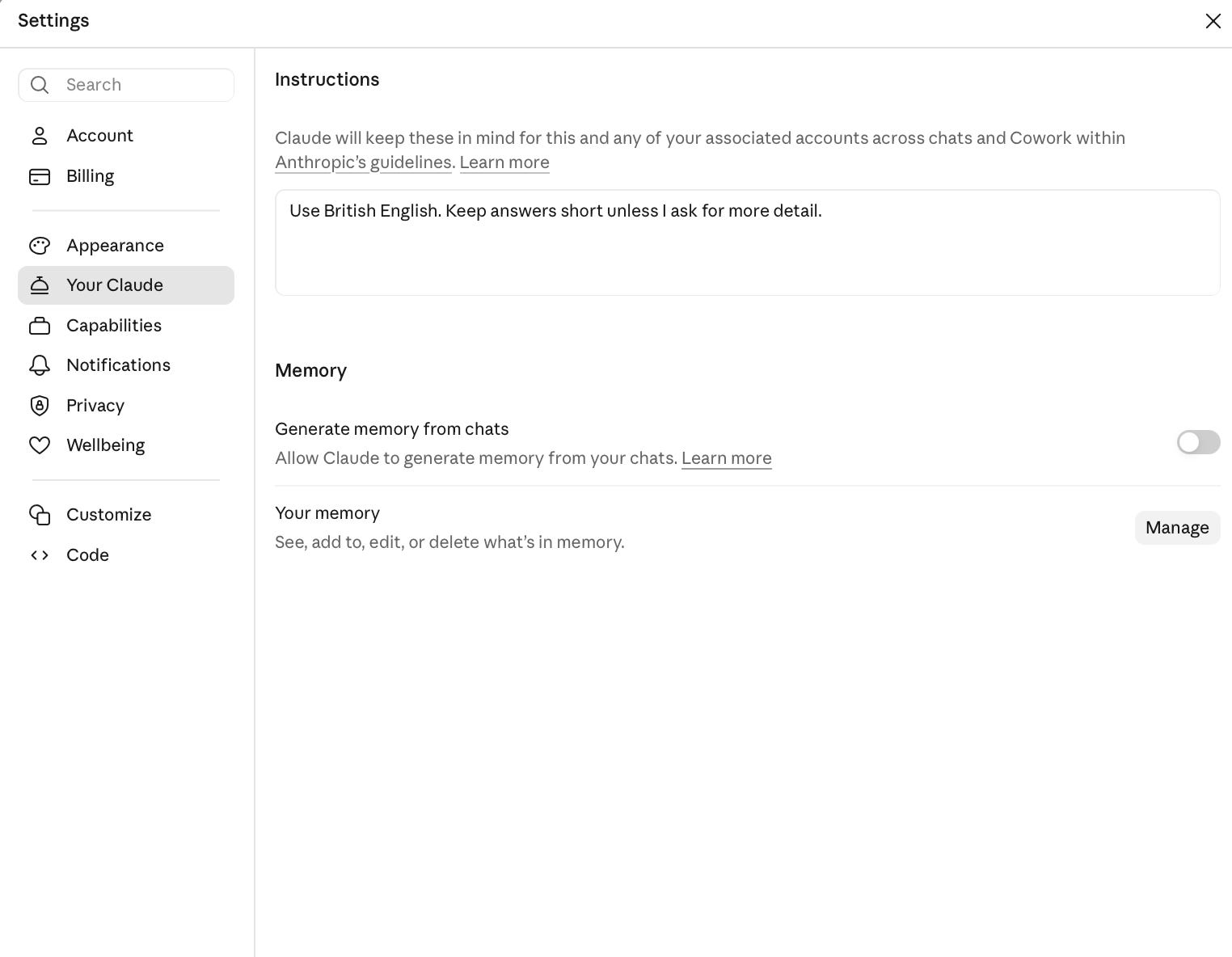
Instructions and Memory now sit together, under Your Claude.
On the same page you will find Memory. When it is on, Claude can remember useful things about you across conversations, and Manage lets you see, edit or delete what it has remembered. On our new free account, it was switched off. Whether you turn it on is your choice.
Level 2: Give your work its own home
A Project is a workspace for one piece of work: a trip, a course, a house move, a side business. It has its own instructions and its own files, and every chat inside it starts already knowing both. The free plan allows up to five Projects.
Click Projects in the sidebar and create one. Then watch for the trap that caught us twice.

Click Projects in the sidebar, then New project.
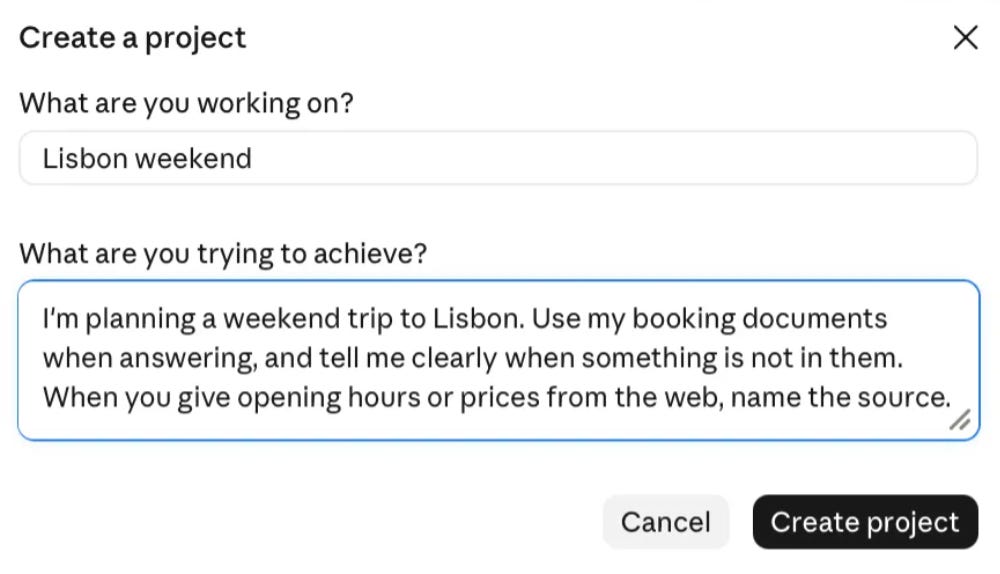
This box looks like instructions, but it only becomes the project’s description.
The creation window asks “What are you trying to achieve?”. It looks like the place for your rules. It isn’t. Whatever you type there becomes a description under the project title.
The real rules go in the Instructions panel on the right of the project page. Click the + next to the word Instructions, not the + next to Context below it, which adds files. These project instructions work alongside the personal instructions from Level 1. We used:
I’m planning a weekend trip to Lisbon. Use my booking documents when answering, and tell me clearly when something is not in them. When you give opening hours or prices from the web, name the source.That last sentence matters. You are not just telling Claude what to do. You are telling it how to show you where its answers come from.
Level 3: Let Claude work from your documents
In the same panel, under Context, click + and upload your files. We uploaded a PDF of our flight and hotel bookings. Every detail in it was invented for the test.
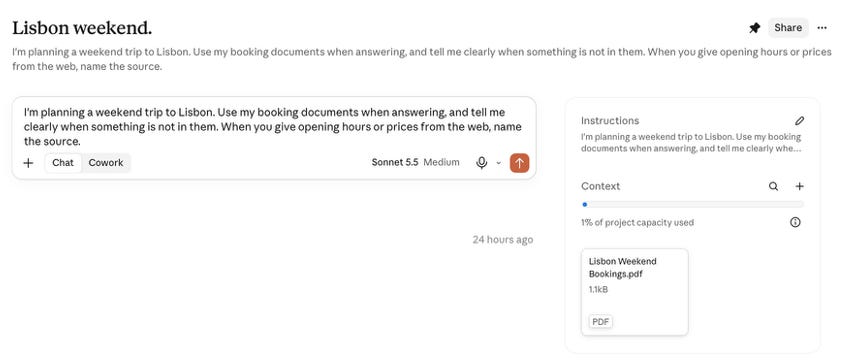
Instructions, documents and chat in one place. Every chat here starts with all of it.
Then we asked a practical question: when does the flight land, when can we check in, and what do we do with our bag in between?
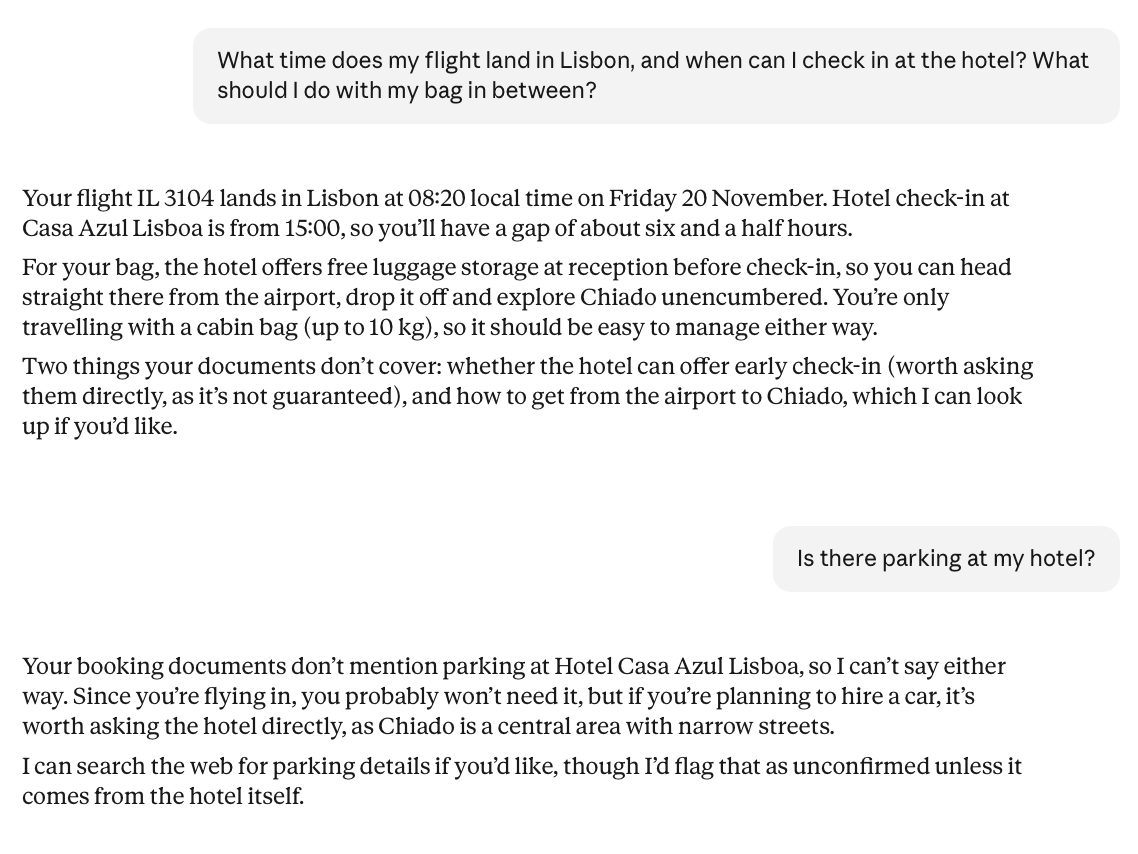
Correct answers from the booking, and an honest “not in your documents” when the booking was silent.
Every detail came straight from the booking: landing at 08:20, check in from 15:00, free luggage storage at reception. Claude also listed what the booking did not say, such as whether early check in was possible. That is the project instruction working.
Then we asked something the booking didn’t cover: is there parking at the hotel? Claude said plainly that the booking didn’t mention it, so it couldn’t say either way. It suggested asking the hotel directly, and offered to search the web, warning that anything it found there would be unconfirmed unless it came from the hotel itself.
That honesty is the most important thing in this guide. A careless answer would have invented a parking policy. When you work from your own documents, a clear “I don’t know” is worth more than a confident guess.
Level 4: Make the web work for you
Claude can search the web on the free plan. The question is what it finds. We asked whether the Belém Tower is open on Saturdays and what a ticket costs.
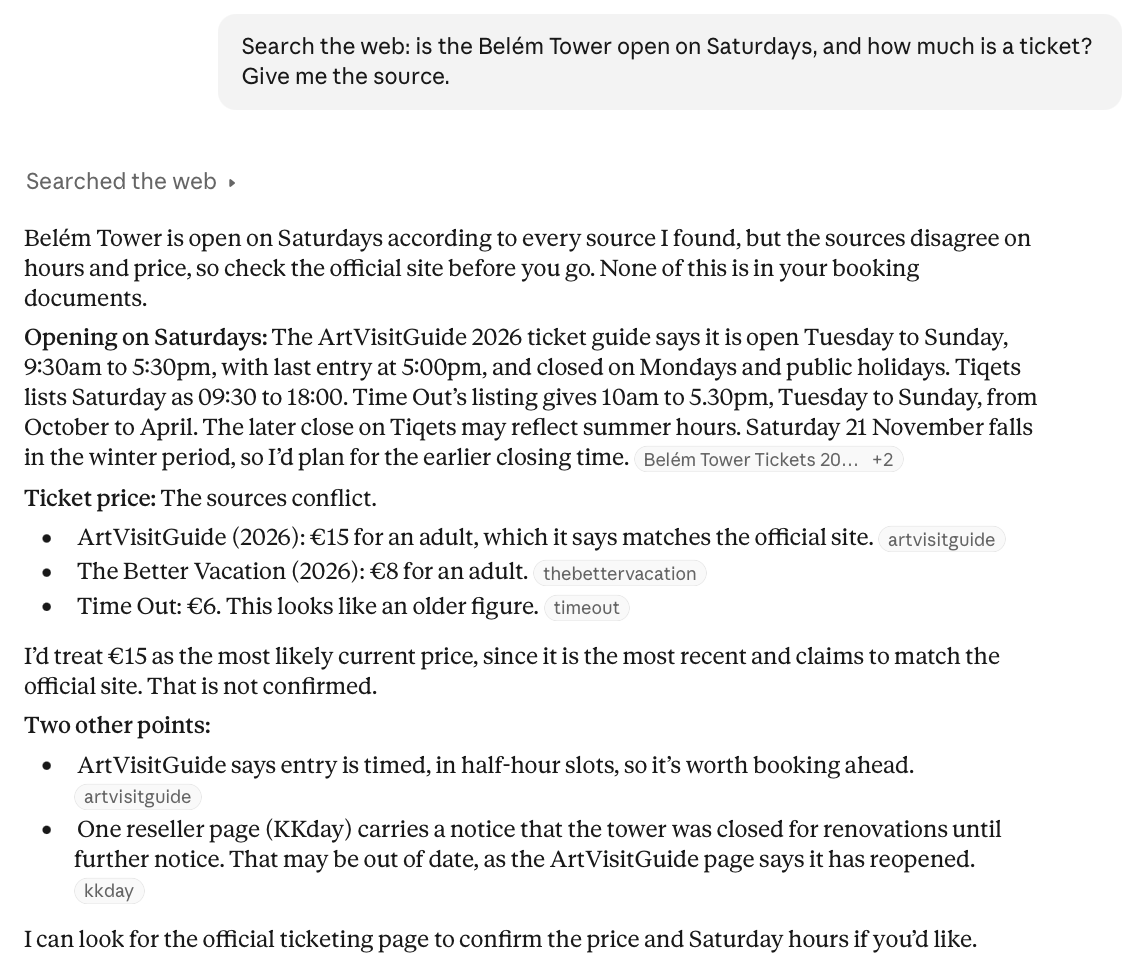
An honest first answer: several sources, clear disagreement and an offer to find the official page.
The first answer leaned on travel guides and ticket sites. They disagreed on opening times and on price. Claude said so, picked the most likely price while marking it as unconfirmed, and offered to find the official page. Honest, but not finished.
So we sent one more message:
Find the official website for the Belém Tower and check the opening hours and ticket price there. Tell me which sources were wrong.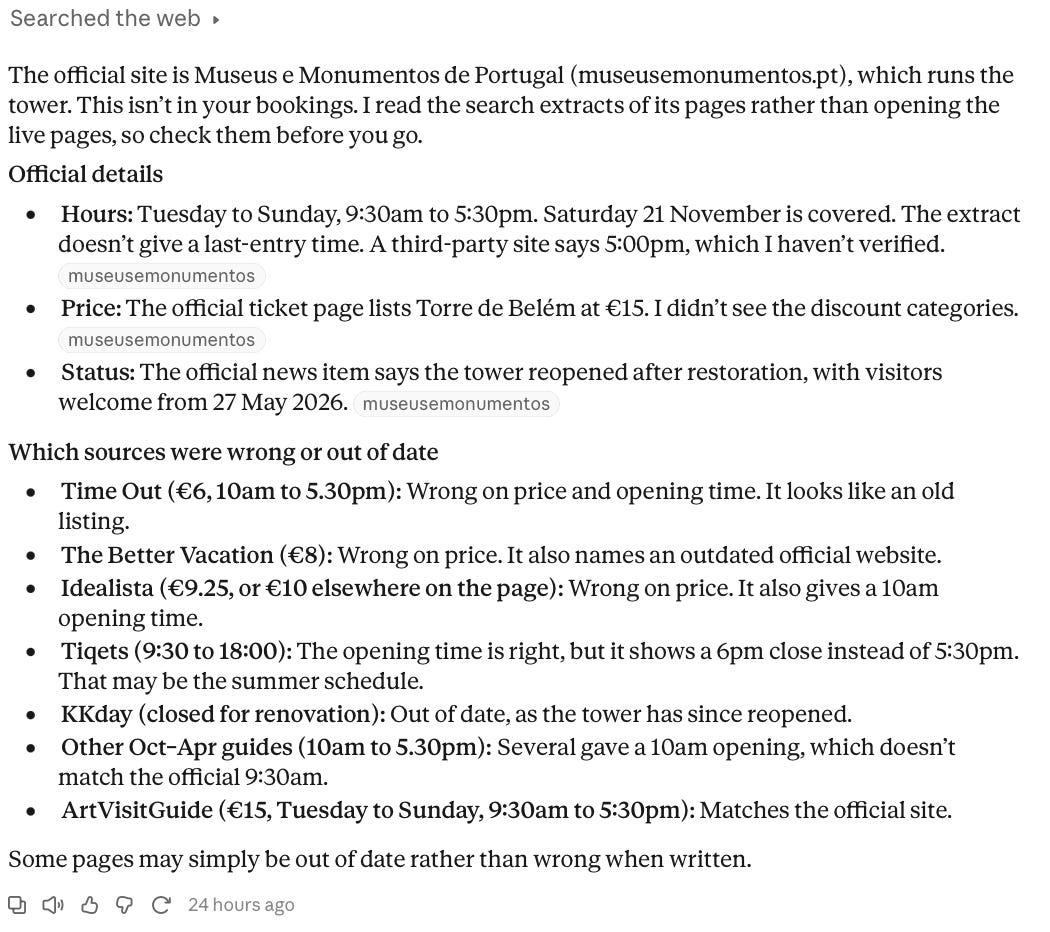
One follow up: the official source, and a list of which sources were wrong or out of date.
Claude identified the organisation that runs the tower, Museus e Monumentos de Portugal, and listed which earlier sources had wrong times, old prices or outdated information. It was also honest about how it worked: it had read search extracts rather than the live pages, and told us to check before going. So we did. We opened the official tower website ourselves, and the opening hours matched.
The lesson: when a web answer matters, ask for the official source by name. And for anything you are about to pay for or travel to, open that source yourself before you rely on it.
Level 5: Turn answers into real files
Finally, we asked for something we could keep:
Create a one page itinerary for my weekend as a document I can download. Use my exact flight and hotel times, and leave free time on Saturday afternoon.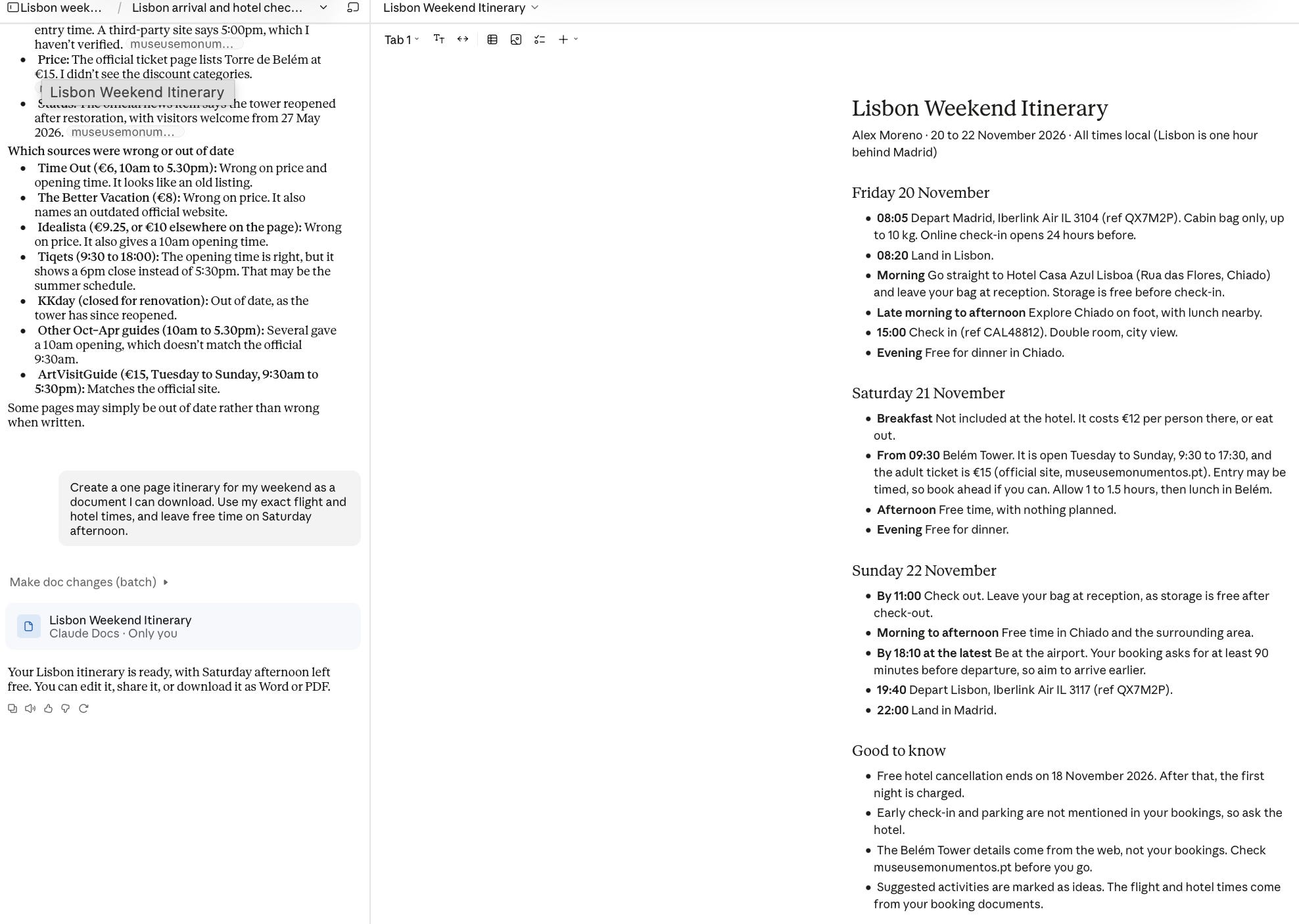
A real document you can edit beside the chat, then download as Word or PDF.
Claude created an editable document beside the chat, with Saturday afternoon left free as we asked. You can edit it, share it, or download it as Word or PDF.
Before you rely on a document like this, check every time and date in it against your original booking. A clean layout makes errors harder to spot, not less likely.
What the free plan doesn’t include
The free plan goes a long way, but not all the way. According to Anthropic’s pricing page, these require a paid plan: Research (longer, deeper investigations), more Claude models including Opus, Claude Code, Claude in Chrome, and scheduling tasks for Claude to do later.
Free usage also has limits that reset every five hours and every week. If you hit one, you wait for it to reset. For planning a weekend, we never came close.
One word on privacy
Projects make it easy to upload documents, so be selective. Our booking was invented. With real documents, remove passport numbers, payment details and anything you would not email to a stranger before you upload. You can also check the Privacy section in Settings to see how your data is handled.
Your five level cheat sheet
Instructions: standing rules for every chat. Settings, Your Claude.
Projects: one workspace per piece of work. Rules go in the Instructions panel, not the description.
Documents: upload them to the project, and ask Claude to say when something isn’t in them.
Web: ask for the official source by name, then open it yourself.
Files: ask for “a document I can download” and check every number in it.
Try it today
Pick one real thing you are working on: a trip, a course, a renovation, a job search. Create a Project for it, write three lines of instructions, upload one document and ask one question you genuinely need answered. Then check the answer against the document.
Your next step
New to Claude? Start with Claude for Complete Beginners: Your First 15 Minutes. Want better answers in every chat? Read How to Prompt AI: A Beginner’s Guide to Better Answers.
If this guide helped, share it with someone who still starts every AI chat from zero. And tell us what you built your first Project for. Your answers shape our next guides.
Last checked: 2 November 2026, using the Claude free plan on the web.